serial monitor에서 계속해서 websocket disconnect라고 뜬다
```
:52:44.860 -> Wi-Fi connected.
```
```
20:52:45.861 -> ESP32 OpenRB motor command bridge ready
```
```
20:52:45.861 -> Type ON, OFF, TOGGLE, STATUS, or MOVE 2048 and press Send.
```
```
20:52:48.310 -> VPS WebSocket disconnected; remote commands are unavailable
```
```
20:52:54.378 -> VPS WebSocket disconnected; remote commands are unavailable
```
가장 흔한 원인: ESP32 시계가 안 맞아서 인증서 검증 실패
ESP32는 부팅 시 시계가 1970년으로 초기화되는데, beginSslWithCA는 인증서의 유효기간(Not Before/Not After)을 실제 시계와 비교.
시간이 안 맞으면 인증서가 "아직 유효하지 않음"으로 보여서 TLS 핸드셰이크가 바로 실패하고 연결이 끊김.
지금 로그처럼 연결 시도도 없이 바로 disconnected 뜨는 패턴이 전형적인 증상.
확인 방법: WiFi 연결 직후, WebSocket 연결 시도 전에 NTP로 시간 동기화하는 코드가 있는지 확인.
NTP로 시간 동기화하는 코드 없으면 아래와 같이 추가:
cpp
#include <time.h>

void syncTime() {
  configTime(0, 0, "pool.ntp.org", "time.nist.gov");
  Serial.print("NTP 시간 동기화 중");
  time_t now = time(nullptr);
  while (now < 100000) {  // 1970년이면 아직 동기화 안 된 것
    delay(500);
    Serial.print(".");
    now = time(nullptr);
  }
  Serial.println("\n시간 동기화 완료");
}
setup()에서 WiFi 연결 성공 직후, connectWebSocket() 호출 전에 syncTime()을 넣어주기.
.
.
.
추가 완료한 항목들 (Wi‑Fi 연결 직후 NTP 동기화를 마친 다음 TLS WebSocket을 연결)
- #include <time.h> 추가
- syncTime()이 pool.ntp.org, time.nist.gov로 시간 동기화
- setup() 순서: connectWiFi() → syncTime() → connectWebSocket()
- ESP32-S3 컴파일 성공 (플래시 80%, RAM 14%)
시리얼 모니터에서 다음이 보이면 정상.
Synchronizing NTP time...
NTP time synchronized
VPS WebSocket connected
또다시 websocket disconnect오류 - GitHub Pages(HTTPS)는 Mixed Content 정책상 암호화 안 된 ws:// 연결을 브라우저가 차단.
Wi-Fi connected. ESP32 IP: 192.168.11.108
20:57:53.086 -> Synchronizing NTP time..........
20:57:58.083 -> NTP time synchronized
20:57:59.084 -> ESP32 OpenRB motor command bridge ready
20:57:59.084 -> Type ON, OFF, TOGGLE, STATUS, or MOVE 2048 and press Send.
20:57:59.827 -> VPS WebSocket disconnected; remote commands are unavailable
20:58:05.668 -> VPS WebSocket disconnected; remote commands are unavailable
20:58:11.821 -> VPS WebSocket disconnected; remote commands are unavailable
20:58:17.752 -> VPS WebSocket disconnected; remote commands are unavailable
20:58:23.774 -> VPS WebSocket disconnected; remote commands are unavailable
20:58:30.870 -> VPS WebSocket disconnected; remote commands are unavailable
20:58:36.704 -> VPS WebSocket disconnected; remote commands are unavailable
20:58:42.926 -> VPS WebSocket disconnected; remote commands are unavailable
20:58:48.891 -> VPS WebSocket disconnected; remote commands are unavailable
20:58:54.596 -> VPS WebSocket disconnected; remote commands are unavailable
20:59:00.236 -> VPS WebSocket discon
해결: VPS에 도메인+Nginx+Let's Encrypt 인증서 발급해서 wss:// 제공
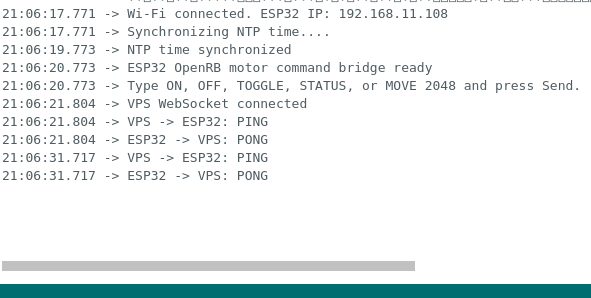
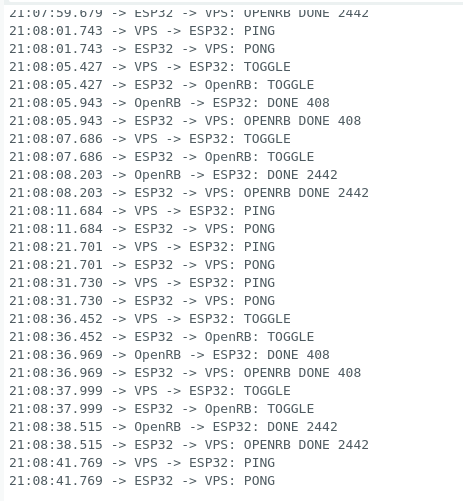
오류해결중
이외에 web socket disconnect관련 트러블슈팅 정리
문제 / 원인 / 해결
| ESP32 WebSocket 계속 disconnected (1차) | 부팅 직후 ESP32 시계가 1970년 → 인증서 유효기간 검증 실패 | NTP로 시간 동기화 후 WebSocket 연결하도록 순서 변경 |
| ESP32 WebSocket 계속 disconnected (2차) | /ws/client 경로로 접속했는데, 이 경로는 브라우저 Origin 검사가 걸려있어서 Origin 헤더 없는 ESP32는 403 거절 | ESP32 경로를 전용 라우트 /ws/esp32(Origin 검사 없음)로 원복 |
| 인증서 신뢰 문제 | ESP32는 브라우저처럼 내장 루트 인증서 저장소가 없음 | VPS의 실제 chain.pem을 뽑아서 beginSslWithCA()로 코드에 하드코딩 |
| WSS 자체가 필요했던 이유 | GitHub Pages(HTTPS)는 Mixed Content 정책상 암호화 안 된 ws:// 연결을 브라우저가 차단함 | VPS에 도메인+Nginx+Let's Encrypt 인증서 발급해서 wss:// 제공 |
최종 기술 스택
📱 Phone (브라우저)
   ↓ HTTPS
GitHub Pages
   ↓ JavaScript, wss://
☁️ VPS
   ├─ Nginx
   ├─ Let's Encrypt SSL 인증서 (Certbot 자동 갱신)
   └─ FastAPI (uvicorn, systemd로 상시 구동)
        ├─ /ws/client  → 브라우저용
        └─ /ws/esp32   → ESP32용
   ↑ wss://
ESP32 (WebSocketsClient 라이브러리, beginSslWithCA + NTP 동기화)
   ↓ UART
OpenRB-150
   ↓
XC330 모터
도메인 2개 역할
- github.io — 프론트(정적 페이지), 무료로 딸려옴
- .com — 백엔드(VPS) 전용, WSS용 SSL 인증서 발급 목적으로 별도 도메인 구매 필요했음
'Life-Switch robot toy project > Process' 카테고리의 다른 글
| Buying Parts to move motor with ESP32 (0) | 2026.08.14 |
|---|---|
| [PROJECT OVERVIEW] Life Switch (0) | 2026.08.11 |